📡 Amateur radio DMR hotspot: your gateway to the world: contact radio amateurs on the other side of the world from your living room, with a DMR handheld and a box no bigger than a pack of cards. An amateur radio DMR hotspot links your digital radio to the Internet and to the worldwide Brandmeister and TGIF networks. No more need for a repeater within range. This complete guide covers the DMR protocol, the hardware, step-by-step installation and talkgroup configuration for Switzerland.
📡 What is DMR?
DMR (Digital Mobile Radio) is a digital standard defined by ETSI (standard TS 102,361). Developed for professional communications, it has been widely adopted by radio amateurs thanks to its robustness, audio quality and spectral efficiency.
DMR technical principles
DMR uses 4FSK modulation and TDMA (Time Division Multiple Access) technology to divide a 12.5 kHz channel into two independent timeslots. Two simultaneous conversations on the same frequency, doubling the capacity compared with analogue FM. Audio is compressed with AMBE+2 at 3600 bps, giving quality comparable to FM in half the bandwidth.
Key DMR concepts
🕒 Timeslots (TS1 / TS2)
Each DMR frequency is divided into two time slots of 30 ms. TS1 is generally used for regional/national TGs, TS2 for local TGs and private calls. On a personal hotspot this distinction matters less.
👥 Talkgroups (TG)
A talkgroup is a virtual “room” identified by a number: TG228 = Switzerland, TG91 = worldwide English, TG9 = local. Static mode (always active) or dynamic mode (activated by pressing PTT).
🎨 Colour Codes (CC)
The equivalent of CTCSS/DCS in analogue. Prevents interference between nearby repeaters. Values: CC0 to CC15. Standard: CC1. Radio and hotspot must use the same CC.
📄 DMR ID
Unique numeric identifier issued by RadioID.net, linked to your callsign. Programmed into the radio and the hotspot. Swiss IDs begin with 228.
Comparison of digital modes
Comparison of the three main digital protocols:
| Feature | DMR | C4FM (Yaesu System Fusion) | D-STAR |
|---|---|---|---|
| Modulation | 4FSK / TDMA | C4FM / FDMA | GMSK / FDMA |
| Bandwidth | 12.5 kHz (2 timeslots) | 12.5 kHz | 6.25 kHz |
| Main network | Brandmeister, TGIF | YSF, FCS, Wires-X | REF, XLX, DCS |
| Number of users | >200,000 | ~80,000 | ~100,000 |
| Entry-level radio cost | ~CHF 100 (Retevis RT3S) | ~CHF 300 (Yaesu FT-70DE) | ~CHF 350 (Icom ID-52E) |
| Manufacturers | Anytone, TYT, Retevis, Hytera, Motorola | Yaesu only | Icom, Kenwood |
💡 Good to know: The big advantage of DMR is its affordable entry cost. As the protocol is an open standard (ETSI), many manufacturers offer compatible radios, driving prices down. A Retevis RT3S costs less than CHF 100, compared with CHF 300+ for an entry-level C4FM or D-STAR radio.
📡 What is a DMR hotspot?
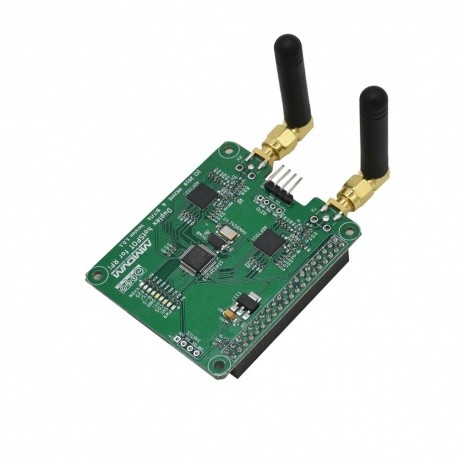
An amateur radio DMR hotspot is a compact personal micro-repeater. It receives the UHF signal from your DMR radio (range: a few metres to a few tens of metres) and relays it via the Internet to the worldwide networks, and vice versa. Three components:
- A single-board computer (Raspberry Pi Zero 2W, Pi 3B+, Pi 4) running the gateway software
- An MMDVM board (Multi-Mode Digital Voice Modem) for UHF transmit/receive on 430-440 MHz
- Software: Pi-Star, WPSD or OpenSpot to manage the network connections
The term MMDVM refers to the open-source radio modem designed by Jonathan Naylor (G4KLX). It supports all the digital modes: DMR, C4FM, D-STAR, P25, NXDN and M17, making your hotspot multimode.
Simplex vs Duplex
🔼 Simplex (Single Hat)
A single frequency alternating between TX and RX. One timeslot at a time. Sufficient for personal use. Price: ~CHF 20-40.
🔽 Duplex (Dual Hat)
Two separate frequencies for TX and RX, two simultaneous timeslots. Works like a mini-repeater. Price: ~CHF 40-80.
💡 Simplex or duplex? For personal use as an amateur radio DMR hotspot, a simplex module is more than enough. Duplex only brings an advantage if you want to emulate a full repeater with two simultaneous timeslots.
Why use a DMR hotspot?
🌐 Worldwide QSOs
Contact stations in Australia, Japan or South America without a directional antenna. The hotspot routes your signal via the Internet to more than 5,000 Brandmeister repeaters around the world.
💰 Minimal cost
Pi Zero 2W (~CHF 20) + MMDVM board (~CHF 30) + case + power supply = less than CHF 100. Add an entry-level DMR radio and off you go.
💻 Portable
The hotspot fits in the palm of your hand, draws less than 2 W and runs on a USB power bank. Ideal when camping or travelling, using Wi-Fi tethering from your smartphone.
📡 No repeater needed
No DMR repeater in your area? The hotspot replaces it by connecting your radio directly to the worldwide network, without depending on local infrastructure.
🔧 Hardware required
Total budget: CHF 70-150 depending on options (not counting the DMR radio).
Essential components
- Raspberry Pi Zero 2W: built-in Wi-Fi (recommended), or Pi 3B+/Pi 4
- MMDVM board: simplex or duplex, SMA antenna
- microSD card: 8 GB minimum, class 10
- USB power supply: 5 V / 2.5 A minimum
- Case: 3D-printed or aluminium
- DMR radio: DMR-compatible handheld or mobile
Recommended MMDVM boards and kits
| Product | Type | Guide price | Notes |
|---|---|---|---|
| MMDVM Simplex HS Hat | Simplex | ~CHF 25-35 | GPIO on Pi Zero 2W. SMA antenna. The most popular. |
| MMDVM Duplex HS Hat | Duplex | ~CHF 45-70 | Two radio modules (TX+RX). For advanced use. |
| JumboSpot | Simplex | ~CHF 30-45 | Compact all-in-one with OLED display. |
| ZUMspot | Simplex / Duplex | ~CHF 55-90 | Excellent quality. USB version available. |
| EuroNode MMDVM | Simplex / Duplex | ~CHF 40-60 | Made in Europe. Compatible with Pi Zero/3/4. |
| Complete Pi Zero 2W kit | Simplex kit | ~CHF 70-100 | Pi + hat + case + microSD + power supply. |
| SharkRF OpenSpot 4 Pro | All-in-one | ~CHF 250-300 | Turnkey, no Pi needed. Touchscreen. Premium. |
💡 Recommended compatible DMR radios:
• Anytone AT-D878UVII Plus: the benchmark amateur DMR radio. Dual band, GPS, Bluetooth, APRS. ~CHF 250-300.
• TYT MD-UV390: rugged IP67 (waterproof) handheld. Dual band DMR/FM. ~CHF 130-160.
• Retevis RT3S: excellent value for money for getting started. ~CHF 80-100.
• Hytera PD785: professional quality. Exceptional audio. ~CHF 200-250 (second-hand).
• Radioddity GD-77: popular for the OpenGD77 firmware (open source). ~CHF 80-100.
💻 Installation with Pi-Star / WPSD
Installing an amateur radio DMR hotspot is easy thanks to Pi-Star and WPSD (W0CHP PiStar Dashboard). WPSD is an improved fork of Pi-Star: modern interface, frequent updates, better hardware support.
Step by step: getting it running
- Download the WPSD image: on wpsd.radio, download the image for your Raspberry Pi (Pi Zero 2W, Pi 3/4).
- Flash the microSD card: use balenaEtcher or Raspberry Pi Imager to write the image to the microSD card (8 GB minimum).
- Configure Wi-Fi: for the Pi Zero 2W (no Ethernet), create a
wpa_supplicant.conffile on thebootpartition with your SSID and password. - Assemble and boot: insert the microSD card, fit the MMDVM board on the GPIO header and plug in the USB power supply. First boot: 2-3 minutes.
- Open the web interface: open
http://wpsd.local/in a browser. Default credentials: pi-star / pi-star. - Configuration wizard: enter your callsign (e.g. HB9HPG), DMR ID, the frequency (e.g. 434.000 MHz) and the Colour Code (CC1).
- DMR network: select DMR Gateway, server
BM_2282_Switzerland, and enter your Hotspot Security Password (created on brandmeister.network). - MMDVM modem: select STM32-DVM HS Hat (GPIO). Set TX power to the minimum (range = your room).
- Program your radio: create a channel with the same frequency, Colour Code CC1, and the timeslot and talkgroup you want, using the manufacturer's CPS software.
- Test it! Press the PTT. Check in the WPSD dashboard and on brandmeister.network → “Last Heard”.
✅ Congratulations! Your hotspot is up and running. Listen to TG91 (worldwide), contact Swiss stations on TG228, or join any TG you like. Setup time: about 15-30 minutes.
🌐 DMR networks: Brandmeister vs TGIF
Your hotspot can connect to either one (or to both via DMR Gateway).
🔹 Brandmeister
The largest amateur DMR network: 5,000+ repeaters, 200,000+ users. Swiss server: BM 2282. Web interface with real-time map, Hoseline listening, static and dynamic talkgroups.
🔸 TGIF
The Global Information Forum: a fast-growing alternative network (~30,000 users). Decentralised approach, themed talkgroups, simple configuration.
Popular talkgroups for Switzerland
The most used talkgroups on Brandmeister:
| TG | Name | TS | Description |
|---|---|---|---|
| TG 228 | Switzerland | TS1 | Swiss national: calling channel, short contacts then QSY. DE/FR/IT. |
| TG 2280 | Schweiz Deutsch | TS2 | Regional, German-speaking Switzerland. Swiss German/German. |
| TG 2281 | French-speaking Switzerland | TS2 | Regional, French-speaking Switzerland. French. Ideal for HB9 clubs. |
| TG 2286 | Ticino | TS2 | Regional, Ticino. Italian. |
| TG 2287 | Graubünden | TS2 | Regional, Graubünden. |
| TG 91 | Worldwide | TS1 | Worldwide, all languages. Very short QSOs. |
| TG 9 | Local | TS2 | Local only (your hotspot). Tests and private QSOs. |
| TG 9990 | Parrot / Echo | TS2 | “Parrot”: repeats your transmission back. Audio test. |
| TG 208 | France | TS1 | France. Of interest to French-speaking HB9 stations. |
| TG 262 | Germany | TS1 | Germany. Contacts with DB/DL/DH/DJ. |
| TG 222 | Italy | TS1 | Italy. Contacts with I/IZ/IU. |
| TG 937 | Francophonie | TS1 | International French-speaking community. F, HB9, ON, VE2, French overseas territories. |
⚠️ Important: DMR ID required! Before transmitting, get a free DMR ID from radioid.net (format 228xxxx for Switzerland, linked to your HB9/HB3 callsign). Turnaround: 1-3 days. Without a DMR ID, the Brandmeister and TGIF networks will reject your connection. Registration: radioid.net/account/register with your callsign and a copy of your OFCOM licence.
⚙️ Talkgroup configuration
There are two ways to access talkgroups: static (always active) and dynamic (activated on demand).
Static talkgroups
Configured in the Brandmeister Self-Care interface, static talkgroups remain permanently active. Log in to brandmeister.network → SelfCare, find your hotspot (DMR ID + 01), and add the TGs you want (e.g. TG228 on TS1).
💡 Recommendation: Limit yourself to 2-3 static talkgroups at most. Each static TG generates continuous traffic. Use dynamic ones for very busy groups such as TG91.
Dynamic talkgroups
They are activated temporarily when you press the PTT with the desired TG selected. After 15 minutes of inactivity, the TG is deactivated. This is the most flexible method: one channel per talkgroup in your radio, and you change channel to change TG.
Programming talkgroups into your radio
Use the manufacturer's CPS software (Customer Programming Software) to program each channel:
| Parameter | Example value |
|---|---|
| TX/RX frequency | 434.000 MHz (same as the hotspot, shift = 0 in simplex) |
| Colour Code | CC1 (must match the hotspot) |
| Timeslot | TS2 (simplex) or TS1/TS2 (duplex) |
| Contact / TG | 228 (Switzerland), one channel per talkgroup |
| Call type | Group Call (always for TGs) |
| Admit Criteria | Color Code Free |
| RX Group List | All the TGs you want to receive |
Choose a clear frequency in the 430-440 MHz UHF band, avoiding repeater frequencies.
💡 Tip: listen before you transmit! Use Brandmeister Hoseline to listen to any talkgroup live from your browser. Ideal for discovering active TGs, checking your transmission and testing your audio via TG 9990 (Parrot).
🇨🇭 Swiss section: DMR in Switzerland
Here is what you need to know to run an amateur radio DMR hotspot in Switzerland.
DMR repeaters in Switzerland
Switzerland has several dozen DMR repeaters, mostly connected to Brandmeister, covering Zurich, Bern, Geneva, Basel and Ticino. The full list is available on uska.ch and on the Brandmeister map (region 228).
USKA and OFCOM
The USKA (Union Schweizerischer Kurzwellen-Amateure) coordinates repeater frequencies in Switzerland and publishes information on digital modes in its magazine HBradio. OFCOM issues HB9 (CEPT) and HB3 (novice) licences. DMR is permitted on the VHF/UHF bands with a valid licence.
Swiss Brandmeister server
Dedicated server: BM 2282 (BM_2282_Switzerland, port 62031). Set up your Hotspot Security Password on brandmeister.network/selfcare. The Swiss administrators can be reached via the regional group 228.
Recommended Swiss talkgroups
To get started with DMR in Switzerland, we recommend the following configuration:
Swiss national: static, so you stay connected permanently.
French-speaking Switzerland: conversations in French with HB9 clubs.
Worldwide: dynamic, for international QSOs.
💡 HB9 tip: Join the French-speaking Swiss DMR net on TG 2281 to test your hotspot and meet other Swiss OMs. Check the schedule on your local USKA section's website.
🤝 Our partners
Phonicom.ch: amateur radio specialist in Switzerland
Phonicom offers DMR radios, hotspots compatible with Pi-Star and WPSD, and all the accessories for your digital communications. Personal advice on setting up your DMR station. Fast delivery within Switzerland.
Visit phonicom.ch →📖 Also on HB9V:
🔗 WPSD: The Ultimate Amateur Radio Hotspot: complete guide to the WPSD software for your hotspot
🔗 Installing and Configuring WPSD: step-by-step tutorial for setting up WPSD
🔗 YSF Reflector: Complete Guide to Yaesu System Fusion: connect your hotspot to the C4FM network
🔗 Swiss Amateur Radio Repeaters: interactive map of FM, DMR, C4FM and D-STAR repeaters in Switzerland