📡 Brandmeister: The Complete Guide to the World’s Largest DMR Network. Find out how to join and use the Brandmeister network, with more than 5,500 repeaters and 16,000 hotspots connected in over 100 countries. This guide covers registration, talkgroups, the dashboard, SelfCare, hotspot configuration and everything specific to Switzerland (HB9).
📡 What is Brandmeister?
Brandmeister is the world’s largest amateur radio DMR (Digital Mobile Radio) network. Founded in June 2014 by Artem Prilutskiy (R3ABM/DL5ABM) and presented at the HamRadio exhibition in Friedrichshafen, Germany, it was designed as an open, community-driven alternative to existing DMR networks such as DMR-MARC.
The name “Brandmeister” is a play on words: it combines “brand new master server” with the German term meaning “fire master”, a nod to its Germanic origins.
💡 In short: Brandmeister is master server software that interconnects DMR equipment (repeaters, hotspots, radios) over the Internet, allowing radio amateurs all over the world to talk to each other through talkgroups.
How does the network work?
The Brandmeister network is built in layers:
🔌 Frontend layer
Drivers for the radio interfaces: Hytera and Motorola repeaters, homebrew MMDVM systems. This is the gateway into the network.
⚙️ Kernel layer
Routing mechanisms and logic processing. Handles switching at the Call Control level (Layer 3) of the DMR stack.
🌐 Service layer
WAN communication protocols: IPSC, CC-Link, APRS, XRF. Allows master servers to interconnect.
📊 Application layer
Built-in services: SMS, APRS, GPS tracking, Parrot (echo), cross-mode gateways to D-STAR, YSF, P25, NXDN.
Each repeater or hotspot connects to a geographically nearby master server. All the master servers are interconnected, forming a worldwide mesh. When you transmit on a talkgroup, your signal is routed instantly to every user connected to that same talkgroup, wherever they are in the world.
The network in figures
Worldwide coverage
Professional-grade infrastructure
Access from home
Themed groups
🔄 Brandmeister vs other DMR networks
Brandmeister is not the only DMR network, but it is the largest and the richest in features. Here is a comparison:
| Criterion | Brandmeister | DMR-MARC / DMR+ | TGIF | FreeDMR |
|---|---|---|---|---|
| Size | The largest network in the world | Structured, more restricted access | Smaller, hotspot-oriented | Decentralised, open source |
| Talkgroups | 1,740+ TGs, dynamic activation | Predefined, static routing | Custom TGs possible | Custom TGs possible |
| Cross-mode | YSF, D-STAR, NXDN, P25, EchoLink | Limited | Limited | Limited |
| Services | APRS, SMS, Parrot, Hoseline, TETRA | Basic | Basic | Basic |
| Hotspots | Excellent (MMDVM, OpenSPOT, etc.) | Moderate | Mainly hotspots | Good support |
| API | Complete, documented API | Limited | Very limited | Limited |
💡 New in 2024: Brandmeister has added support for TETRA (Terrestrial Trunked Radio) through the “TetraPack.Online” project. TETRA offers 4 timeslots (versus 2 for DMR), full-duplex conversations and better audio quality.
📝 Registration: getting access to Brandmeister
Registration is a two-step process: first obtain a DMR ID (a unique identifier), then create a Brandmeister account.
Step 1: get a DMR ID from RadioID.net
Your DMR ID is a unique 7-digit number that identifies you on every DMR network. It is linked to your amateur radio callsign.
- Go to radioid.net
- Click “Log In/Sign Up” and create an account
- Enter your callsign (e.g. HB9XXX), your licence class and the expiry date
- Upload an official copy of your OFCOM licence (Swiss amateur radio licence)
- Wait for verification, usually within 24 hours, sometimes up to 2 days
- Receive your 7-digit DMR ID by email
⚠️ Important: you only need ONE DMR ID. The ID is linked to the operator, not the equipment. Use the same ID in all your radios and hotspots.
Step 2: create a Brandmeister account
- Go to brandmeister.network/?page=register
- Fill in the form: callsign, email (ideally the same one as on RadioID.net), and select “Personal User Account”
- Create a password
- Answer the anti-spam question: “What is the common wavelength used for amateur radio operations in the UHF Band?” Answer: 70 (as in 70 cm)
- Complete the reCAPTCHA and submit
- You will receive a confirmation email within 15-30 minutes
- A member of the Brandmeister team validates your account manually, usually within 48 hours
✅ Tip: use the same email address for RadioID.net and Brandmeister, as this speeds up the verification of your account.
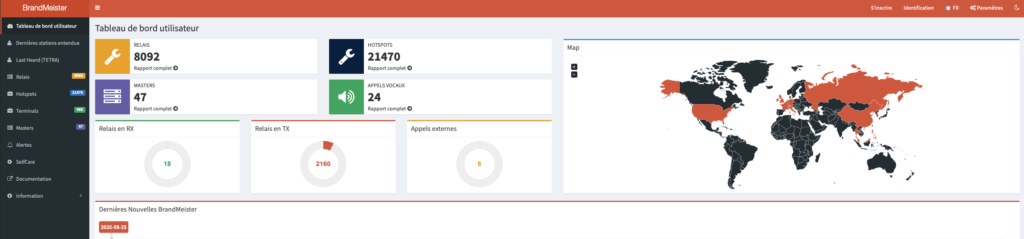
📊 The Brandmeister dashboard
The dashboard at brandmeister.network is the network’s control centre. It offers many features, even without an account.
Last Heard
The Last Heard screen shows every transmission on the network in real time: callsign, DMR ID, talkgroup, time slot, source (repeater or hotspot) and duration. You can filter by master server: for example, add ?page=lh&Master=2282 to see only Swiss traffic.
Hoseline: live listening
The Hoseline (hose.brandmeister.network) lets you listen live to any talkgroup from your browser or the Android app, without needing a radio and without logging in.
🎧 Single or multi-TG listening
Listen to a single talkgroup or monitor several at once. Solo mode isolates one TG.
📊 Built-in VU meter
Colour-coded audio level indicator: yellow (< -20 dBm), green (-20 to -3 dBm), red (> -3 dBm).
🔊 Automatic normalisation
All transmissions are played at a consistent volume, regardless of the source.
💾 Persistent subscriptions
Your list of talkgroups is saved between sessions. Automatic reconnection.
Network map
The interactive map shows every connected repeater and hotspot in the world, with their online/offline status in real time.
Other dashboard features
- Call statistics: traffic analytics by talkgroup, master server and repeater
- Talkgroup directory: complete list with descriptions
- Cluster management: organising repeaters into groups
- Contact export: for importing into your radio
- 17+ languages supported, light and dark modes available
📻 Understanding talkgroups
Talkgroups (TGs) are the central concept of Brandmeister. They are virtual “chat rooms” identified by a number. When you transmit on a TG, every user connected to that TG hears you.
Static vs dynamic talkgroups
| Type | How it works | Duration | Activation |
|---|---|---|---|
| Static | Permanently assigned to a timeslot. All traffic is passed automatically. | Permanent, never times out | Configured by the repeater/hotspot owner via SelfCare |
| Dynamic | Activated temporarily when a user transmits on that TG. | 15 minutes after the last local transmission | Press PTT on the desired TG |
| Auto-static | Simplex hotspots only. The hotspot locks onto the last TG activated. | Permanent until the TG is changed | Automatic on a simplex hotspot |
💡 Quick disconnect: to disconnect all dynamic talkgroups, make a group call to TG 4000. This frees the timeslot for other talkgroups.
Time slots (TS1 and TS2)
Each DMR channel is divided into two time slots using TDMA technology, allowing two simultaneous conversations on the same frequency:
- TS1 (Time Slot 1): reserved for international and national talkgroups (TG 91, TG 228, TG 920, etc.)
- TS2 (Time Slot 2): reserved for regional and local traffic (TG 2280, TG 2281, TG 9, etc.)
⚠️ Important rule: always respect the TS1/TS2 allocation. A QSO on TG 228 (TS1) blocks TS1 on ALL Swiss repeaters. That is why TG 228 is a calling channel: you make contact there, then move to a regional or tactical TG.
🇨🇭 Swiss talkgroups (HB9)
Switzerland has a complete talkgroup structure on Brandmeister, coordinated by the network administrators HB9STJ, HB9DUU, HB9TQJ, HB9FEF and HB9FND.
National talkgroups: TS1
| TG | Name | Description |
|---|---|---|
| 228 | Switzerland | National calling channel, permanent on ALL Swiss repeaters. Brief contacts only, then QSY. |
| 228112 | EMCOM CH | Swiss emergency communications |
Tactical talkgroups: TS1 (user-activated)
| TG | Name | Use |
|---|---|---|
| 22801 | User-Activated 1 | Tactical channel for longer QSOs after the initial contact on TG 228 |
| 22802 | User-Activated 2 | Same, alternative tactical channel |
| 22803 | User-Activated 3 | Same |
| 22804 | User-Activated 4 | Same |
| 22810 | WIRES-X | HB9-BM-WIRESX gateway |
Regional talkgroups: TS2
| TG | Region | Language |
|---|---|---|
| 2280 | Schweiz deutsch | German |
| 2281 | French-speaking | French |
| 2282 | Wallis / Valais | Bilingual |
| 2283 | Bern / Solothurn | German |
| 2284 | Basel | German |
| 2285 | Aargau / Central Switzerland | German |
| 2286 | Ticino | Italian |
| 2287 | Graubünden | German / Romansh |
| 2288 | Zürich | German |
| 2289 | Eastern Switzerland | German |
| 8 | Cluster | Group of local repeaters |
| 9 | Local | Local range only |
French-speaking cantonal talkgroups: TS2
For radio amateurs in French-speaking Switzerland, here are the cantonal talkgroups:
| TG | Canton / Region |
|---|---|
| 22811 | Vaud |
| 22812 | Geneva |
| 22813 | Vaud Alps |
| 22814 | Valais Alps |
| 22815 | Neuchâtel |
| 22817 | Fribourg |
✅ For HB9V members: the most relevant talkgroups are TG 2281 (Romandie), TG 22811 (Vaud) and TG 937 (international French-speaking community). For longer QSOs, use the tactical TGs 22801-22804.
🌍 International talkgroups
Worldwide and European talkgroups: TS1
| TG | Name | Description |
|---|---|---|
| 91 | Worldwide | The most active TG, all languages. Very short QSOs only. Worldwide check-in every Saturday at 16:00 UTC. |
| 92 | Europe | European communications |
| 93 | North America | North America |
| 95 | Australia / Oceania | Oceania |
| 98 | Test | Equipment tests: use this one, NOT TG 91 |
| 910 | German | German-speaking community |
| 913 | English | English-speaking community |
| 920 | D-A-CH | Germany / Austria / Switzerland |
| 310-319 | TAC 310-319 | Tactical channels, NOT calling channels |
French-language talkgroups
For French-speaking radio amateurs, here are the main talkgroups:
| TG | Name | Description |
|---|---|---|
| 937 | Francophonie | International French-speaking community, the main TG for QSOs in French |
| 2281 | French-speaking | French-speaking Switzerland (TS2) |
| 208 | France | French national talkgroup |
| 2081 | Île-de-France | Paris region |
| 2082 | North-West France | Brittany, Normandy, etc. |
| 2083 | North-East France | Alsace, Lorraine, etc. |
| 2084 | South-East France | PACA, Rhône-Alpes, etc. |
| 2085 | South-West France | Aquitaine, Occitanie, etc. |
| 2087 | Technical discussions | For technical discussions in French |
Special services
| TG / ID | Service | Use |
|---|---|---|
| 9990 | Parrot (echo) | Private call, repeats your transmission (max 90 sec). Ideal for testing your audio. |
| 228999 | GPS/RRS/ARS | GPS configuration and position services (Switzerland) |
| 4000 | Disconnect | Group call, disconnects all dynamic TGs |
⚙️ The SelfCare portal
SelfCare (brandmeister.network/?page=selfcare) is your personal control panel. Once logged in, you can manage every aspect of your presence on the network.
Hotspot security
🚨 CRUCIAL: enable hotspot security! In SelfCare, enable “Hotspot Security” and set a personal password. This stops anyone from using your DMR ID on an unauthorised hotspot. Without this protection, anybody can transmit under your callsign.
SelfCare features
🔐 Security
Air Security: QR code for device authentication. Hotspot Security: personal password. API Key: key for third-party integrations.
📡 Static talkgroups
Add or remove static talkgroups per DMR ID. Select the timeslot (TS1 or TS2). Changes take effect within 10-30 seconds.
📱 SMS brand
Select the SMS protocol that matches your radio: Motorola, Hytera or Chinese Radio (AnyTone, Retevis). Essential for text messages.
🗺️ APRS
APRS configuration: Talker Alias text, transmission interval, GPS settings. Requires ARS (Motorola) or RRS (Hytera) to be enabled.
💡 Tip for AnyTone radios: if you use an AnyTone (AT-D878, AT-D578, etc.), set the SMS brand to “Chinese Radio” or “Motorola” in SelfCare, and enable M-SMS in the radio’s CPS.
🔌 Setting up a hotspot
A DMR hotspot is a personal mini-repeater that connects your radio to the Brandmeister network over the Internet. The two most popular software packages are Pi-Star and WPSD.
Prerequisites
- A valid DMR ID from RadioID.net
- A Brandmeister account with a hotspot password set in SelfCare
- An MMDVM hotspot (Jumbospot, MMDVM_HS, ZUMspot, etc.)
- A Raspberry Pi (Pi Zero 2 W, Pi 3, Pi 4 or Pi 5)
- Pi-Star or WPSD installed on the SD card
Configuring Pi-Star / WPSD for Brandmeister
- Open the Pi-Star/WPSD dashboard in your browser (
http://pi-star.localor via its IP address) - In Configuration → General: enter your callsign and your 7-digit DMR ID
- Enable DMR mode and select simplex or duplex according to your hardware
- In DMR Configuration → DMR Master: select BM_2282_Switzerland (the Swiss master server in Zurich)
- Enter the hotspot password set in Brandmeister SelfCare
- Set the ESSID: use “01” for your first hotspot (01-99 if you have several)
- Set the frequency (e.g. 431.020 MHz in simplex) and the Color Code
- Save and check: green “DMR Net” = successfully connected
✅ Connection test: make a private call to 9990 (Parrot). If you hear your own voice played back, your hotspot is correctly configured!
💡 WPSD vs Pi-Star: WPSD is the open-source successor to Pi-Star, with a more modern interface, Raspberry Pi 5 support, more frequent updates and additional modes (M17, POCSAG). It is recommended for new installations.
Diagnostic codes
| Indicator | Meaning | Action |
|---|---|---|
| Green “DMR Net” | Connected and operational | Everything is working correctly |
| Yellow | Connection problem | Check the hotspot password and the GPS format |
| Red | Configuration error | Check the DMR ID, master server and Internet connection |
📱 Mobile Apps
Hoseline (official app)
The Hoseline app is available for Android (Google Play) and as a web version (hose.brandmeister.network). It lets you listen to any talkgroup in real time without a radio or a login.
BM Monitor / BM Client
The BM Client app (Android) offers advanced features:
- Real-time Last Heard
- Built-in Hoseline audio
- Remote hotspot control, management of static and dynamic TGs
- One-click clearing of dynamic TGs
💡 For iOS users: there is no dedicated iOS app. Use the web Hoseline at hose.brandmeister.network in Safari: it works perfectly on iPhone and iPad.
🔗 The Brandmeister API
Brandmeister offers a complete REST API, documented at api.brandmeister.network/docs/. It lets you automate the management of your hotspot and integrate Brandmeister into your own projects.
Getting an API key
- Log in to SelfCare
- Go to Profile Settings → API Keys
- Generate a new key in JSON Web Token format (API v2, recommended)
- Use it in your requests with
--user '[API_KEY]:'
Usage examples
Retrieve a hotspot’s profile:
GET /v1.0/repeater/?action=profile&q=[REPEATER_ID]
Add a static talkgroup:
POST /repeater/talkgroup/?action=ADD&id=[REPEATER_ID]
Body: { "talkgroup": 2281, "slot": 2 }
Remove all dynamic TGs:
POST /repeater/setRepeaterTarantool.php?action=dropDynamicGroups
Body: { "id": [REPEATER_ID] }
⚠️ API security: your API key gives full access to the SelfCare features. Protect it like a password. Create separate keys for each application and revoke them if they are compromised.
📋 DMR good practice and etiquette
DMR is a shared resource with network latency constraints. Your transmission may be heard by hundreds or thousands of users. A higher level of courtesy than on analogue FM is expected.
Essential rules
⏱️ Courtesy pause
Wait at least 2-3 seconds after the end of a transmission before pressing PTT. This allows for network latency, repeater TX/RX switching and lets other stations break in.
🎙️ PTT procedure
Press PTT and wait for the confirmation beep before speaking. Then wait one more second. Set TX Admit to “Color Code Free”.
👂 Listen before transmitting
Listen for at least 30 seconds before transmitting on a TG. Check whether a conversation is in progress and understand the context.
📍 Use the right TG
Always use the most local talkgroup possible: Local > Regional > National > Worldwide. The big TGs are shared resources.
Time limits and QSY
- Most large talkgroups have a 10-minute limit per QSO
- For longer conversations: move to a TAC channel (310-319) or a tactical TG (22801-22804 in Switzerland)
- TG 91 (Worldwide): very short QSOs only, as it is a calling channel with a worldwide audience
- Test your equipment on TG 98, never on TG 91
Identification
⚠️ Legal requirement: your DMR ID does NOT replace voice identification. In Switzerland, as in most countries, you must give your callsign by voice at least every 10 minutes (OFCOM regulations). Example: “This is HB9HPG in Lausanne, on TG 2281 Romandie.”
Audio quality
- DMR digitises the audio with no levelling in transit, so correct levels are critical
- Test with the Parrot (9990) or ask the stations you work to check
- Keep an appropriate distance between the microphone and your mouth
- Audio that is too loud distorts and audio that is too quiet cannot be heard: the Parrot gives you immediate feedback
🇨🇭 Swiss DMR infrastructure
Swiss master server
Switzerland uses the master server BM 2282 (Zurich), active since 29 October 2021. The former BM 2281 server (Geneva) was decommissioned on 31 December 2021.
💡 Good to know: thanks to its good performance, many foreign repeaters and hotspots also connect to BM 2282. It is not unusual to hear QSOs from Uruguay, China or the United Arab Emirates on the Swiss server!
DMR repeaters in Switzerland
Switzerland has around 68 DMR repeaters spread across the country. Here are the main repeaters in French-speaking Switzerland and the major cities:
| Callsign | Location | TX frequency | CC | Multimode |
|---|---|---|---|---|
| HB9IAP | La Barillette, VD | 438.250 MHz | 1 | - |
| HB9AE | Lutry, VD | 439.200 MHz | 1 | - |
| HB9MM | La Praz, VD | 438.850 MHz | 1 | FM, D-STAR, Fusion |
| HB9GE | Geneva (Meyrin) | 439.425 MHz | 1 | - |
| HB9RD | Châtonnaye, FR | 438.663 MHz | 1 | - |
| HB9UCQ | Bulle, FR | 438.950 MHz | 1 | D-STAR, Fusion |
| HB9PS | Martigny, VS | 144.900 MHz | 1 | D-STAR, Fusion |
| HB9F | Bern | 438.588 MHz | 1 | - |
| HB9ZF | Uetliberg, ZH | 439.563 MHz | 1 | - |
| HB9CSR | Basel | 438.550 MHz | 1 | D-STAR, Fusion |
| HB9DD | Mt. Tamaro, TI | 438.463 MHz | 1 | - |
💡 Hotspot configuration for Romandie: select BM 2282 as the master server. As a static talkgroup on TS2, set TG 2281 (Romandie). Test with the Parrot (private call 9990).
Swiss operating convention
1. Initial contact on TG 228 (national calling channel, TS1)
   → “This is HB9HPG, calling on TG 228”

2. Suggest a QSY to a regional or tactical TG
   → “Shall we move to TG 22801?”

3. QSO on TG 22801 (tactical, TS1) or TG 2281 (Romandie, TS2)
   → Normal QSO with no time limit on the tactical TGs

4. End of the QSO: the dynamic TG disconnects after 15 min
   → Or make a group call to TG 4000 to disconnect immediately
Swiss resources
- swissdmr.ch: official Swiss DMR site (news, repeater list, guides)
- dmr.zone: additional DMR information
- uska.ch/en/dmr/: the USKA DMR page
- RepeaterBook, Swiss DMR: complete list of Swiss DMR repeaters
📝 Summary: the essential talkgroups
Here are the talkgroups to program into your radio first for use in French-speaking Switzerland:
| TG | Name | TS | Use |
|---|---|---|---|
| 228 | Switzerland | TS1 | National calling channel (brief contacts) |
| 2281 | French-speaking | TS2 | French-speaking Switzerland, the main TG for French speakers |
| 22811 | Vaud | TS2 | Canton of Vaud |
| 22801 | Tactical 1 | TS1 | Longer QSOs after contact on TG 228 |
| 937 | Francophonie | TS1 | International French-speaking |
| 91 | Worldwide | TS1 | Worldwide (short QSOs, all languages) |
| 920 | D-A-CH | TS1 | Germany / Austria / Switzerland |
| 9990 | Parrot | - | Private call, audio echo test |
| 4000 | Disconnect | - | Group call, disconnects dynamic TGs |
🤝 Our partners

Phonicom.ch: amateur radio specialist in Switzerland
At Phonicom you will find Brandmeister-compatible DMR radios, Pi-Star/WPSD hotspots, programming accessories and all the equipment you need to join the worldwide DMR network. Personal advice and delivery within Switzerland.
Visit phonicom.ch →📚 Also on HB9V
- 📡 DMR Hotspot for Radio Amateurs: Complete Guide: Pi-Star, WPSD, step-by-step Brandmeister configuration
- 📻 WPSD: The Ultimate Amateur Radio Hotspot: installing and configuring the successor to Pi-Star
- 🛰️ Installing a YSF Reflector: set up your own Yaesu System Fusion reflector
- 🌐 XLX Multiprotocol Reflector: cross-mode gateway for D-STAR, DMR and YSF