📡 EchoLink for Radio Amateurs: Complete Guide
EchoLink is free VoIP software that connects radio amateurs all over the world via the Internet. Whether you are at your radio or simply have your smartphone with you, EchoLink gives you access to thousands of repeaters and stations around the globe. Available on PC, Mac, Android and iOS, it is used by more than 350,000 licensed radio amateurs. This complete guide explains everything: how it works, registration, installation, configuration and practical use.
📡 What is EchoLink?
EchoLink is a voice over IP (VoIP) system designed specifically for radio amateurs. Developed by Jonathan Taylor, K1RFD, and launched in 2002, it links repeaters, simplex stations and individual users via the Internet. EchoLink revolutionised long-distance amateur communications by removing the limitations imposed by propagation.
In practice, EchoLink acts as a bridge between the radio world and the Internet. A radio amateur in Geneva can talk to a fellow amateur in Tokyo through local repeaters connected to the network. The voice signal is digitised, sent over the Internet, then retransmitted over the air by a distant repeater.
The software is available for Windows, macOS (via Wine), Android (Google Play Store) and iOS (App Store). Unlike consumer VoIP systems, EchoLink requires a valid amateur radio licence: every callsign is verified at registration.
Comparison of amateur radio VoIP systems
| Feature | EchoLink | IRLP | AllStar Link | Wires-X |
|---|---|---|---|---|
| Developer | K1RFD | VE7LTD | WB6NIL (open source) | Yaesu |
| Year | 2002 | 1997 | 2006 | 2014 |
| Cost | Free | Free (specific hardware) | Free (open source) | Included with Yaesu radio |
| Mobile app | ✔ Android + iOS | ✘ No | ✘ No | ✘ No |
| Direct PC access | ✔ User mode | ✘ Via radio only | ✘ Via radio only | ✘ Via Yaesu radio |
| Active nodes | ~6’000+ | ~3’000 | ~3’500+ | ~3’000+ |
| Compatibility | Any FM repeater | Any FM repeater | Any FM repeater | Yaesu C4FM radios |
| Ease of use | ★★★★★ | ★★★☆☆ | ★★★☆☆ | ★★★★☆ |
⚙️ How EchoLink works
EchoLink is built on a system of numbered nodes connected via the Internet. Each node is identified by a unique 4-6 digit number. There are three types of node:
- -R (Repeater): node connected to a repeater. Radio users access the network through this repeater (e.g. HB9AG-R).
- -L (Link): node connected to a simplex transmitter (a single frequency). Ideal for local use (e.g. HB9BS-L).
- User: connected directly from a PC or smartphone, with no radio equipment (e.g. HB9HPG).
Signal path
Here is the typical path of a voice signal via EchoLink:
The audio signal is digitised and sent over the Internet with a typical delay of 0.5 to 2 seconds. Users in PC/mobile mode connect directly without going through a physical repeater. DTMF commands let you control the node remotely by radio: enter the number of the remote node to connect, # to disconnect.
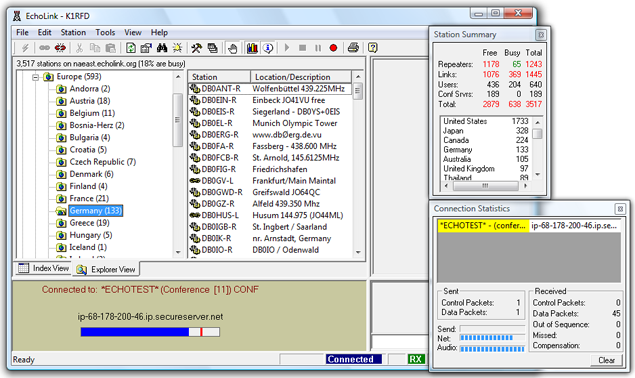
EchoLink also offers conference servers (prefixed with *) for group QSOs: *FRANCOPHONE* for discussions in French, *ECHOTEST* to test your audio, *WORLDWIDE* for a worldwide room open to all.
💰 100% Free
The EchoLink software is completely free, with no subscription or hidden costs. Development is supported by voluntary donations from the amateur radio community.
📱 Cross-platform
Available for Windows, macOS, Android and iOS. Access the network from your computer, tablet or smartphone, wherever you are in the world.
🌐 Worldwide network
More than 350,000 users and 6,000+ active nodes. Connect to repeaters on every continent, far beyond your radio range.
🔧 Easy installation
The mobile app is set up in a few minutes. For a sysop node, a Raspberry Pi with an audio interface is enough to connect your repeater to the worldwide network.
👤 Creating an EchoLink account
Registering with EchoLink requires a valid amateur radio licence. Here is the full procedure:
Step 1: Prepare your documents
Gather your amateur radio callsign (e.g. HB9HPG), a legible scan of your official licence (JPEG or PNG) and a valid e-mail address.
Step 2: Register on echolink.org
Go to echolink.org, download the software and install it. When you first start it, enter your callsign. The system will send a validation e-mail with a link for submitting proof of your licence.
Step 3: Licence validation
Upload a scan of your licence (OFCOM for Switzerland, ARCEP/ANFR for France). For some countries (USA, UK), verification is automatic against national databases. Allow 24 to 48 hours for validation.
⚠️ Licence required: You MUST hold a valid amateur radio licence to use EchoLink. Registration requires proof (a scan of your licence or official verification). Swiss HB9/HB3 callsigns issued by OFCOM are accepted. Without a valid licence, your registration will be refused. Using EchoLink without a licence is an offence under telecommunications regulations.
💻 Installation and configuration
On a PC (Windows / Mac)
Download EchoLink from echolink.org/download. Run the installer, enter your callsign and password, then configure the audio settings (microphone and speakers). Make sure ports UDP 5198-5199 and TCP 5200 are open in your firewall/router. The Windows version offers Sysop mode for running a node connected to a repeater.
On mobile (Android / iOS)
Download the “EchoLink” app from the Google Play Store or the App Store. Log in with your callsign and password and allow microphone access. The interface shows the list of available nodes. Tap a node to connect, then use the on-screen PTT button to transmit.
Sysop mode vs User mode
| Feature | User mode | Sysop mode |
|---|---|---|
| Use | Personal communication | Running a node (repeater) |
| Hardware | PC/smartphone + mic | PC + audio interface + radio |
| Suffix | None (e.g. HB9HPG) | -L (link) or -R (repeater) |
| 24/7 connection | No (manual) | Yes (permanent) |
| DTMF | Not applicable | Yes (remote control) |
6 steps to get started with EchoLink
- Download EchoLink: go to echolink.org and download the version for your platform (Windows, Android or iOS). The software is completely free.
- Register and validate your licence: create an account with your amateur radio callsign, submit a scan of your licence and wait for validation (24-48 h).
- Set up the audio: select the right device (mic + speakers). Adjust the level to avoid overdriving. Test with *ECHOTEST*.
- Connect to a node: look for a nearby repeater in the list (Europe > Switzerland). Click “Connect” and wait for confirmation.
- First QSO: press PTT and announce yourself: “This is HB9xxx via EchoLink”. Follow standard operating procedure.
- Explore the conferences: connect to the rooms (prefixed with *). Try *FRANCOPHONE* if you would like to chat in French.
📡 Practical use
Searching and connecting
The app offers several ways to search:
- By callsign: enter the node's callsign (e.g. HB9AG-R)
- By node number: type the number directly (e.g. 352477)
- By location: browse Europe > Switzerland > available nodes
- By conference: search by keyword (“francophone”, “swiss”)
Once connected, follow good practice: identify yourself with your callsign, leave a pause of 1-2 seconds between transmissions (network delay), listen first before transmitting, and disconnect when you have finished.
💡 *ECHOTEST* node: The *ECHOTEST* node (number 9999) records your transmission and plays it straight back. It is the perfect tool for checking your audio quality, your modulation level and the latency of your connection. Connect, talk for a few seconds, then release the PTT: you will hear your own voice echoed back. Clear sound = optimal configuration. Choppy sound = adjust your audio settings.
Network configuration
| Port | Protocol | Use |
|---|---|---|
| 5198 | UDP | Incoming audio (receive) |
| 5199 | UDP | Outgoing audio (transmit) |
| 5200 | TCP | Control (server connection) |
On mobile networks (4G/5G), the ports are usually open. On home Wi-Fi, set up port forwarding on your router (Swisscom, Sunrise, Salt).
🇨🇭 EchoLink nodes in Switzerland
Switzerland has a network of EchoLink nodes covering the main regions of the country. Swiss radio amateurs (HB9/HB3) are particularly active thanks to the country's excellent Internet infrastructure.
| Callsign | Type | Location | Frequency | Notes |
|---|---|---|---|---|
| HB9AG-R | Repeater | Solothurn / Mittelland | 438.675 MHz | Active node, Mittelland region |
| HB9BS-L | Link | Basel | 145.2375 MHz | Simplex link, Basel region |
| HB9EAS-R | Repeater | Zurich | 438.750 MHz | Repeater, Zurich region |
| HB9HD-R | Repeater | Winterthur | 438.825 MHz | Eastern Switzerland |
| HB9LU-R | Repeater | Lucerne | 438.650 MHz | Central Switzerland |
| HB9RJ-R | Repeater | Jura | 145.600 MHz | French-speaking Switzerland |
| HB9IAP-L | Link | Ticino | 144.975 MHz | Italian-speaking Switzerland |
| HB9BO-R | Repeater | Bern | 438.700 MHz | Federal capital |
💡 Finding Swiss nodes: In the EchoLink app, go to Index > Location > Europe > Switzerland to display all connected HB9 nodes in real time. You can also check echolink.org/logins.jsp.
🔧 Setting up an EchoLink node (Sysop)
To connect your repeater to the EchoLink network, you can set up your own node in Sysop mode. Hardware required:
- Dedicated computer: Windows PC or Raspberry Pi (with SvxLink on Linux)
- Audio interface: USB sound card or dedicated interface (SignaLink USB, RIGblaster)
- Radio or repeater: FM transceiver for a simplex link (-L) or a full repeater (-R)
- Permanent Internet connection: stable fibre or ADSL
Setup involves: registering a -L or -R callsign on echolink.org, installing the software in Sysop mode, configuring the audio levels and PTT, opening the network ports, and testing with *ECHOTEST*. The Raspberry Pi is an excellent platform thanks to its low power consumption and silent operation. SvxLink is the most popular open-source solution for Linux.
💡 Mobile tip: The EchoLink smartphone app lets you connect from anywhere with an Internet connection: ideal for radio amateurs who are travelling, on holiday or on business trips. Even without your radio station, you can join your club's QSOs or chat with contacts on the other side of the world. It is one of the great strengths of the EchoLink system.
🇨🇭 EchoLink in Switzerland: Swiss section 🇨🇭
The Swiss amateur radio community is very active on EchoLink. The USKA (Union Schweizerischer Kurzwellen-Amateure) encourages the use of VoIP technologies as a complement to traditional radio communications.
Regulatory context
EchoLink may be used by holders of an amateur radio licence issued by OFCOM (Swiss Federal Office of Communications). The HB9 licence (CEPT class 1) gives full access and allows you to run a Sysop node. The HB3 licence (novice) allows user access with the usual power limitations.
EchoLink activities of Swiss clubs
Several USKA sections and regional clubs use EchoLink for remote club meetings, regional nets at fixed times, training (exam preparation courses) and emergency exercises (ARES/AREN). The HB9V club (Radio Amateurs of Canton Vaud) encourages its members to discover EchoLink as a complement to their everyday radio activities.
In Switzerland, EchoLink coexists with the other digital modes: DMR (very widespread via Brandmeister), C4FM (Yaesu System Fusion and Wires-X), D-STAR, APRS (144.800 MHz) and Winlink. Some repeaters offer EchoLink access alongside their conventional FM operation.
🤝 Our partners

Phonicom.ch: amateur radio specialist in Switzerland
Phonicom stocks EchoLink-compatible VHF/UHF handhelds, accessories and audio interfaces for setting up your node. The team will help you choose your equipment. Fast delivery within Switzerland.
Visit phonicom.ch →📖 Also on HB9V:
🔗 Amateur Radio Repeaters in Switzerland: Interactive Map: find FM, DMR, C4FM and D-STAR repeaters near you
🔗 WPSD: The Ultimate Amateur Radio Hotspot: set up your own personal digital hotspot
🔗 YSF Reflector: Complete Guide to Yaesu System Fusion: discover C4FM reflectors
🔗 XLX Reflector: Multiprotocol Gateway: connect DMR, D-STAR and C4FM together