📍 What is a QTH locator and why is it essential in amateur radio?
The QTH locator (also called the QRA locator or Maidenhead locator) is a geographic coordinate system designed specifically for radio amateurs. It pinpoints a radio station anywhere on the planet with a simple code such as JN36BK or JN25WQ. This complete guide tells you everything you need to know about the QTH locator: understanding the system, finding your locator, calculating distances and pointing your antennas accurately.
🎯 What is a QTH locator?
The QTH locator (or QRA locator) is an alphanumeric code that identifies a specific geographic position on Earth. Unlike conventional GPS coordinates (latitude/longitude), the Maidenhead system was developed specifically for amateur radio and offers several practical advantages.
📌 QTH locator example
JN25WQ - corresponds to an area in France
IO91VL - corresponds to London, United Kingdom
Each code represents a rectangular area whose precision depends on the number of characters used (from 2 to 10 characters).
🔍 Why use a QTH locator?
6 alphanumeric characters are easier to exchange on voice than a full latitude/longitude
Precision increases with the number of characters: 2 (very broad) to 10 (ultra-precise)
Recognised and used by radio amateurs all over the world
Lets you quickly calculate distances and bearings between stations
Mandatory on VHF/UHF to validate contacts and visualise coverage
Precise calculation of the beam heading (bearing) to point at the other station
📐 The Maidenhead system: how does it work?
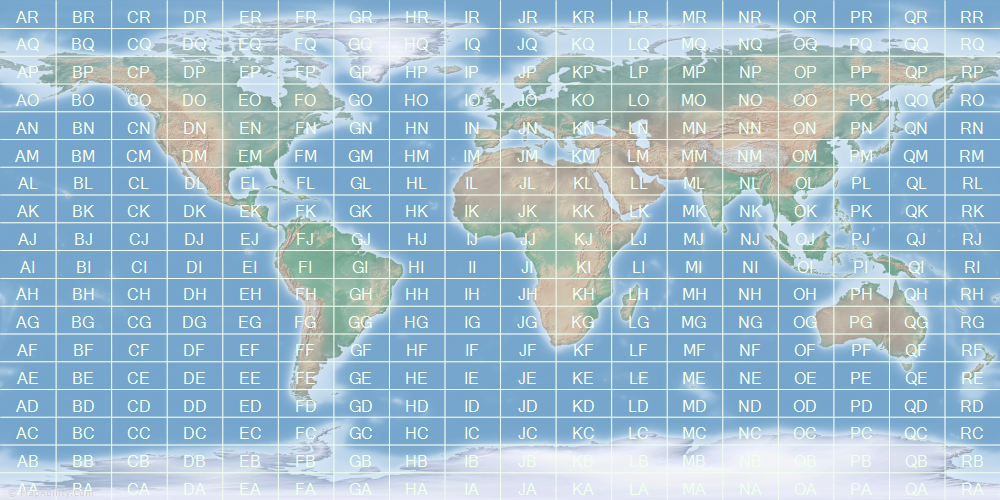
The Maidenhead Locator System divides the Earth into a hierarchical grid of ever smaller rectangles. Understanding this structure will help you make better use of QTH locators and interpret them.
🌍 Structure of the Maidenhead system
| Level | Characters | Grid size | Example | Use |
|---|---|---|---|---|
| Field | 2 letters (AA-RR) | 20° longitude × 10° latitude (~1,200 km) | JN36BK | Continental location |
| Square | 2 digits (00-99) | 2° longitude × 1° latitude (~120 km) | JN36BK | Region/county |
| Subsquare | 2 letters (aa-xx) | 5' longitude × 2.5' latitude (~6 km) | JN36BK | Town/district (standard) |
| Extended square | 2 digits (00-99) | 30" longitude × 15" latitude (~600 m) | JN36BK45 | Street/building precision |
| Super extended | 2 letters (aa-xx) | 1.25" longitude × 0.625" latitude (~30 m) | JN36BK45AB | Maximum GPS precision |
💡 Practical tip: in amateur radio, the 6-character format (Field + Square + Subsquare) is generally used, as it offers a good compromise between precision (~6 km) and ease of exchange. The 4 and 8-character formats are less common but do exist.
📝 Notation rules
- Capital letters (A-R) represent the main divisions (Fields)
- Digits (0-9) represent the intermediate subdivisions (Squares)
- Lower-case letters (a-x) represent the fine subdivisions (Subsquares)
- The grid starts at the South Pole and the antimeridian (180° West)
- Fields use the 18 letters from A to R, subsquares the 24 letters from a to x
🌐 Main uses of the QTH locator
📻 VHF/UHF/SHF operating
Essential for operating on the VHF and higher bands (from 50 MHz upwards), where geographic precision is crucial for pointing directional antennas.
🏆 Contests
A mandatory part of the exchange on VHF/UHF to validate QSOs. Lets you visualise geographic coverage on contest maps.
🎯 Beam heading calculation
Determines the exact bearing for pointing your directional antenna at the other station (long path or short path).
📏 Distance calculation
Lets you quickly calculate the distance between two stations for QSLs, awards and statistics.
🛰️ Satellite communications
Used when working via amateur radio satellites (ISS, OSCAR satellites) to locate stations.
🗺️ DX mapping
Plotting the contacts you have made on Maidenhead maps to track the progress of your activity.
📌 Important note: on HF, the QTH locator is used less, because distances are generally greater and antenna pointing is less critical. The callsign prefix (for example HB9 for Switzerland) is preferred instead.
🛠️ The best online tools to find your QTH locator
Many free tools let you find your QTH locator, calculate distances and work out bearings. Here is a selection of the best online services, tried and tested by the amateur radio community.
🥇 Top recommended tools
🗺️ TK5EP QRA Locator Map - the most complete tool
⭐ RECOMMENDED 🇫🇷 French interface 🗺️ Interactive maps
Developed by TK5EP, this tool offers an interactive map interface for viewing and finding locators. It is one of the most popular tools in the amateur radio community.
Features:
- Interactive world map based on OpenStreetMap
- Maidenhead grid shown as an overlay
- Click on the map to get the locator instantly
- Search by coordinates or by locator
- Progressive zoom for maximum precision
- Data export
📐 K7FRY Grid Square Calculator - advanced calculations
⭐ RECOMMENDED 🇬🇧 In English 🧮 Precise calculations
Developed by K7FRY, this tool is perfect for distance and bearing calculations and coordinate conversions.
Features:
- Distance calculation between two QTH locators
- Bearing in degrees (long path and short path)
- Locator ↔ GPS coordinates conversion
- Support for extended formats (8 and 10 characters)
- Simple, fast interface
- High-precision calculations
🔧 Other specialised tools
| Tool | Main features | Language | Link |
|---|---|---|---|
| F1RZV Locator OSM | OpenStreetMap map with Maidenhead grid, multiple calculations | 🇫🇷 French | Open |
| F1RZV complete calculator | Distance, bearing, conversions between multiple coordinate formats | 🇫🇷 French | Open |
| VOACAP QTH | Locator with built-in propagation predictions | 🇬🇧 English | Open |
| HA8TKS Ham Geocoding | Advanced geocoding for radio amateurs, with an API | 🇬🇧 English | Open |
| Giangrandi Converter | DMS ↔ decimal conversion, coordinate calculations | 🇬🇧 English | Open |
| AMSAT Grid Calculator | Official AMSAT tool for satellite calculations | 🇬🇧 English | Open |
| Levine Central | Find the locator from a callsign | 🇬🇧 English | Open |
⚠️ Please note: the f6fvy.free.fr/qthLocator/ site, which used Google Maps, no longer works. Google started charging developers for its mapping service. The alternatives listed above use OpenStreetMap and remain free.
📱 Mobile apps for iOS and Android
To find your QTH locator on the move, mobile apps are available. They use your smartphone's GPS to determine your position automatically.
🍎 Recommended iOS apps
📱 QTH Compass
⭐ Recommended 🧭 Comprehensive
A comprehensive app with a built-in compass for antenna pointing. Perfect for POTA, SOTA and contests. Distance and bearing calculation and map display.
📲 Download on the App Store📱 Easy QTH Locator
⭐ Popular ⚡ Simple
Clean, simple interface. Instant GPS detection, works offline. Compatible with iPhone, iPad and Mac (Apple Silicon). Ideal for beginners.
📲 Download on the App Store📱 QTH Grid Square Locator
🆕 New 🗺️ Modern
A recent app (2024) with an interactive map view. Real-time calculation via GPS. Works offline. Optimised for iOS 18+ and compatible with Apple Vision Pro.
📲 Download on the App Store📱 QTH Locator (micro systems)
🎯 Precise 🔒 Private
Precise grid square calculation with a clear interface. No personal data collected. Compatible with iOS 12+, so it even works on older iPhones.
📲 Download on the App Store📱 QTH-Locator (Timur Isaev)
🗺️ Mapping ⌚ Apple Watch
Full map view with markers. Apple Watch support so you can check your locator on your wrist! Address search and position history.
📲 Download on the App Store📱 QTH-Locator Lite
🆓 Free ⚡ Lightweight
A lightweight free version with the essential features. Automatic GPS calculation, address search and distance calculation. Perfect for getting started.
📲 Download on the App Store💡 iOS tip: the QTH Compass and Easy QTH Locator apps are particularly recommended for their reliability and good ratings. QTH Compass is ideal for POTA/SOTA activations thanks to its built-in compass.
🤖 Recommended Android apps
📱 Easy QTH Locator
⭐ Popular 🔝 Top
Simple, intuitive interface. Automatic GPS detection, distance and bearing calculation. One of the most downloaded Android apps for radio amateurs.
📲 Get it on Google Play📱 QTH Locator by SDR Labs
🎯 Precise 📊 Comprehensive
Real-time display with continuous updates. Coordinate conversion between multiple formats. History of positions visited. Professional interface.
📲 Get it on Google Play📱 HamLog
📝 Logbook 🔄 Auto
A complete logbook with automatic locator calculation for every QSO. Cloud sync. Statistics and ADIF export. Ideal for contests.
📲 Get it on Google Play📱 WWLocator
🗺️ Mapping 📍 Markers
Advanced map view with a Maidenhead grid overlay. Custom markers to save your favourite locators. Position sharing.
📲 Get it on Google Play📱 QTH Locator Lite
⚡ Fast 🪶 Lightweight
An ultra-light (<5 MB), fast app. Starts instantly. Ideal for portable and pedestrian portable use, or on older smartphones with little memory.
📲 Get it on Google Play💡 Android tip: when operating portable (hiking, SOTA, pedestrian portable), make sure your smartphone's GPS is switched on and that the app has the permissions it needs to access your location. Remember to download offline maps if you are operating in an area with no network coverage.
✅ iOS vs Android: both platforms offer excellent apps. On iOS, QTH Compass stands out with its built-in compass, perfect for antenna pointing. On Android, HamLog is unique with its complete logbook. Easy QTH Locator is available on both platforms and offers a consistent experience.
💻 Windows/Mac/Linux software
🖥️ Locator Magic - a complete Windows application
⭐ RECOMMENDED 🪟 Windows
A professional Windows application for converting Maidenhead locator codes to and from latitude/longitude positions, calculating the route between two positions (distance, outbound/return bearing) and displaying it all on a map of the Earth.
Main features:
- Two-way Locator ↔ GPS coordinates conversion
- Great circle distance calculation
- Long path and short path bearings
- Display on an interactive world map
- Support for extended formats (up to 10 characters)
- Export of results
- Intuitive interface in French/English
🔧 Other desktop software
For a full selection of QTH locator calculation and map editing software:
📚 DXZone catalogue🎓 Practical guide: how to find your QTH locator
Here are several methods for working out your QTH locator, from the simplest to the most precise.
Method 1: use TK5EP QRA Locator (recommended)
- Go to the website: open https://www.egloff.eu/qralocator/ in your browser.
- Find your position: the map shows Europe by default. Use the zoom controls (+/-) or your mouse wheel to navigate. You can also search for your town in the search bar.
- Click on your location: click precisely on your position (house, shack). The QTH locator appears instantly at the top of the screen.
- Note down your locator: you will see a code such as JN36BK (standard 6 characters). If you zoom in further, you will get greater precision with 8 or 10 characters.
- Check the grid: the Maidenhead grid is overlaid on the map. Make sure your position is inside the square shown.
✅ Result: you now have your QTH locator! Keep a careful note of it for your future VHF/UHF QSOs.
Method 2: use K7FRY with GPS coordinates
- Find your GPS coordinates: use Google Maps, your smartphone or a GPS to get your coordinates (latitude/longitude).
- Go to the calculator: open https://k7fry.com/grid/
- Enter the coordinates: in the “Lat/Lon to Grid” section, enter your latitude and longitude in decimal format (e.g. 46.2044° N, 6.1432° E).
- Click Calculate: the QTH locator appears instantly.
- Coordinate formats: the tool accepts several formats: decimal (46.2044), DMS (46°12'16") or DMM (46°12.27').
Method 3: mobile app (on the move)
- Install an app: download “Easy QTH Locator” or “QTH Locator by SDR Labs” from Google Play.
- Turn on GPS: make sure location services are enabled on your smartphone.
- Open the app: it will detect your GPS position automatically.
- Read the locator: your QTH locator is shown in real time and updates as you move.
- Save: most apps let you save your favourite positions (shack, portable, etc.).
📏 Calculating the distance and bearing between two stations
Once you know your QTH locator and that of the other station, you can calculate the distance between you and the bearing for pointing your antenna.
🧮 Using K7FRY for calculations
- Go to K7FRY: open https://k7fry.com/grid/
- Enter both locators: in the “Distance and Bearing” section, enter your QTH locator and that of the other station.
- Run the calculation: click “Calculate”. You instantly get:
• 🌍 Distance: in kilometres and miles
• 🧭 Bearing (Short Path): the shortest bearing
• 🧭 Bearing (Long Path): the bearing round the other side of the Earth - Point your antenna: use the short path bearing to point your beam in the right direction.
📍 Practical example:
Your station: JN36BE (Geneva)
Other station: IO91VL (London)
Results:
🌍 Distance: ~748 km
🧭 Short path bearing: 315° (north-west)
🧭 Long path bearing: 135° (south-east)
🗺️ Viewing it on a map
To view your QTH and that of the other station on a map:
- Use TK5EP QRA Locator
- Enter both locators in the search box
- The map shows both positions with the Maidenhead grid
- You can then see the path geographically
🏆 The QTH locator in VHF/UHF contests
In VHF/UHF contests, the QTH locator is a mandatory part of the exchange. Here is how to use it effectively.
📋 Structure of a typical contest QSO
[Other station]: “HB9HPG de F5ABC, good day”
[You]: “F5ABC de HB9HPG, you are 59 in JN36BK. Over.”
[F5ABC]: “HB9HPG de F5ABC, thanks for the 59, 59 in JN25WQ. 73 and good contest!”
Note that you exchange: RST report + QTH locator
🗺️ Contest maps
After the contest, you can plot all your QSOs on a Maidenhead map to see your geographic coverage.
Identify the missing areas and plan your next contests
Prove your contacts for geographic awards
Track how your activity develops over time
Set precise geographic goals
🎯 Practical use cases
📡 VHF DX
You are in QSO with a distant station on VHF. Exchange locators to calculate the distance and confirm the DX.
Distance: 412 km. Nice tropo DX!”
📻 SOTA activation
You are activating a summit portable. Your locator changes with your position. Use a mobile app to work it out automatically.
QTH locator: JN37MD
Alt: 1850m”
🛰️ Satellite contacts
For amateur radio satellite passes (ISS, OSCAR satellites), the locator tells you whether you are within the coverage area.
Locator: JN36BK
Elevation: 45° at 290°”
🏔️ Tropospheric propagation
By analysing the QSOs you have made together with their locators, you can identify favourable propagation conditions (tropo, sporadic E, etc.).
All towards the north-east
→ Probably a tropo opening”
💡 Tips and good practice
📝 Tips for using the QTH locator well
- Memorise your locator: you should know it by heart, like your callsign!
- Standard format: use 6 characters (e.g. JN36BK) for 99% of situations
- Clear pronunciation: on voice, spell it out letter by letter using the phonetic alphabet: “Juliett November Three Six Bravo Kilo”
- Check: if possible, ask for the locator to be repeated to avoid copying errors
- Reasonable precision: 6 characters (~6 km precision) is more than enough for most purposes
- Mind the upper and lower case: convention: CAPITAL letters, digits, lower-case letters (e.g. JN36bk)
- Logbook: always record the locator in your log for future statistics
💬 Advice from an experienced radio amateur: “Always keep a small laminated Maidenhead map in your shack. It is handy for quickly seeing where the other station is without switching on the computer!”
❓ Frequently asked questions (FAQ)
❓ How precise should my locator be?
6 characters (e.g. JN36BK) are more than enough for 99% of uses. It is the norm in amateur radio. The 8 and 10-character formats are reserved for very specific cases (microwave, EME, etc.).
❓ Can my locator change?
Yes, if you move house! Your QTH locator depends on your geographic position. When operating portable (/P), it changes with your location. Update your QRZ.com profile if you move.
❓ Do I have to give my locator on HF?
It is not mandatory on HF, but you can. On HF, people tend to exchange the callsign prefix (e.g. HB9, F5, DL, etc.) and the RST. The locator is mainly used from 50 MHz upwards.
❓ How do I find the locator for a callsign?
Use Levine Central or look it up on QRZ.com. Many OMs show their locator on their QRZ page.
❓ QRA or QTH locator, what is the difference?
None! They are two terms for the same thing. In Q code, “QTH” means “location” and “QRA” means “name of the station”. Both are accepted.
❓ Can you have several locators?
Yes! You have a main locator (home shack) but also temporary locators if you operate portable, mobile or from different locations (holiday home, remote antenna, etc.).
🔧 Troubleshooting and common problems
🚨 Frequent problems and solutions
❌ Problem: the calculator gives me a strange locator (impossible letters such as “ZZ”)
✅ Solution: check your GPS coordinates. Valid letters run from A to R (no S, T, etc.). If you see anything else, your coordinates may be in the wrong format.
❌ Problem: my mobile app does not detect my position
✅ Solution: check that GPS is switched on and that the app has location permissions. Go outside for better GPS reception.
❌ Problem: the calculated distance looks wrong
✅ Solution: check that both locators are correct. A single wrong letter or digit can give a completely wrong distance. Also check whether you are looking at the distance in km or in miles.
❌ Problem: I don't understand “short path” and “long path” bearings
✅ Solution: short path = the shortest route. Long path = round the other side of the Earth (a difference of 180°). On VHF/UHF, always use the short path. On HF, the long path can be useful depending on propagation.
📚 Further reading
🎓 Additional resources
📖 Official documentation:
- Wikipedia - Maidenhead Locator System
- IARU documentation on locator standards
- Technical books on VHF/UHF contesting
🎯 Awards using the QTH locator:
- Worked All Squares (WAS) - contact stations in different grid squares
- VUCC (VHF/UHF Century Club) - 100 different confirmed grid squares
- Regional awards - many countries offer locator-based awards
🛰️ Advanced software:
- WSJT-X - uses locators for the FT8/JT65 modes
- Ham Radio Deluxe - mapping and logging with locators
- N1MM Logger+ - contest logger with full locator support
- VOACAP - propagation predictions by grid square
🎯 Ready to use your QTH locator?
You now have all the knowledge you need to find, use and understand the QTH locator system. Feel free to experiment with the various tools presented in this guide!
Next QSO: give out your locator with pride! 📡
🗺️ Find my locator now📋 Summary of the essential tools
| Type | Recommended tool | Use |
|---|---|---|
| 🗺️ Interactive map | TK5EP QRA Locator | Find a locator visually |
| 🧮 Calculations | K7FRY Grid Calculator | Distance and bearing between locators |
| 📱 Android mobile | Easy QTH Locator | Locator on the move |
| 💻 PC software | Locator Magic | A complete Windows application |
| 🔍 Callsign lookup | Levine Central | Find a callsign's locator |